
Omnext MCP · for AI agents and assistants

Your quality and security data, AI-agent ready.

Omnext MCP opens every analysis result to the AI tools your teams already use: ratings, rules, findings, metrics, open-source components and vulnerabilities, across your whole Mendix landscape. Ask in plain language, combine data across applications, and let your agents act on it. Read-only, and Omnext stays the source of truth.

Part of every Omnext subscription. Works with Claude, ChatGPT, Copilot and any MCP-capable agent or IDE.
omnext-mcp-hero
What it exposes

Everything the platform knows, one question away.

Omnext MCP exposes the complete analysis data of the Omnext platform, not a summary and not an export. Every answer traces back to a rule, a finding or a measured unit.

Ratings

The compliancy rating of your landscape and of every application, overall and per area: maintainability, reliability, security, performance and open source.

Rules and findings

Which rules fire, in which applications, how often and since when. Drill from a rule to the applications it affects, or from an application to its open findings.

Model metrics

The units of each application (microflows, pages, entities and more) with their metrics, filterable in one call: every microflow with more than 20 shapes, for instance.

Components and vulnerabilities

Marketplace modules and open-source dependencies with their versions and licences, and the known vulnerabilities (CVEs) that affect them.

Analysis runs

What is being analysed now, what is planned, and the latest scan of each application, so an agent always works from current data.

Only what you are allowed to see

The MCP applies your own Omnext permissions. An agent sees the organisations and applications its user is authorised for, nothing else.

Use cases

What teams do with it.

From finding to ticket, without the spreadsheet

Your agent reads the latest results through Omnext MCP, prioritises the findings by severity and area, creates the tickets in Jira or Azure DevOps and assigns them to the developers who own the module.

Use case 01

One CVE, the whole landscape

A new vulnerability is published, or one finding turns up in a review. In a single question the agent checks whether the same component, version or finding occurs anywhere else in your landscape, and lists the applications that need the same fix.

Use case 02

Questions that span analyses

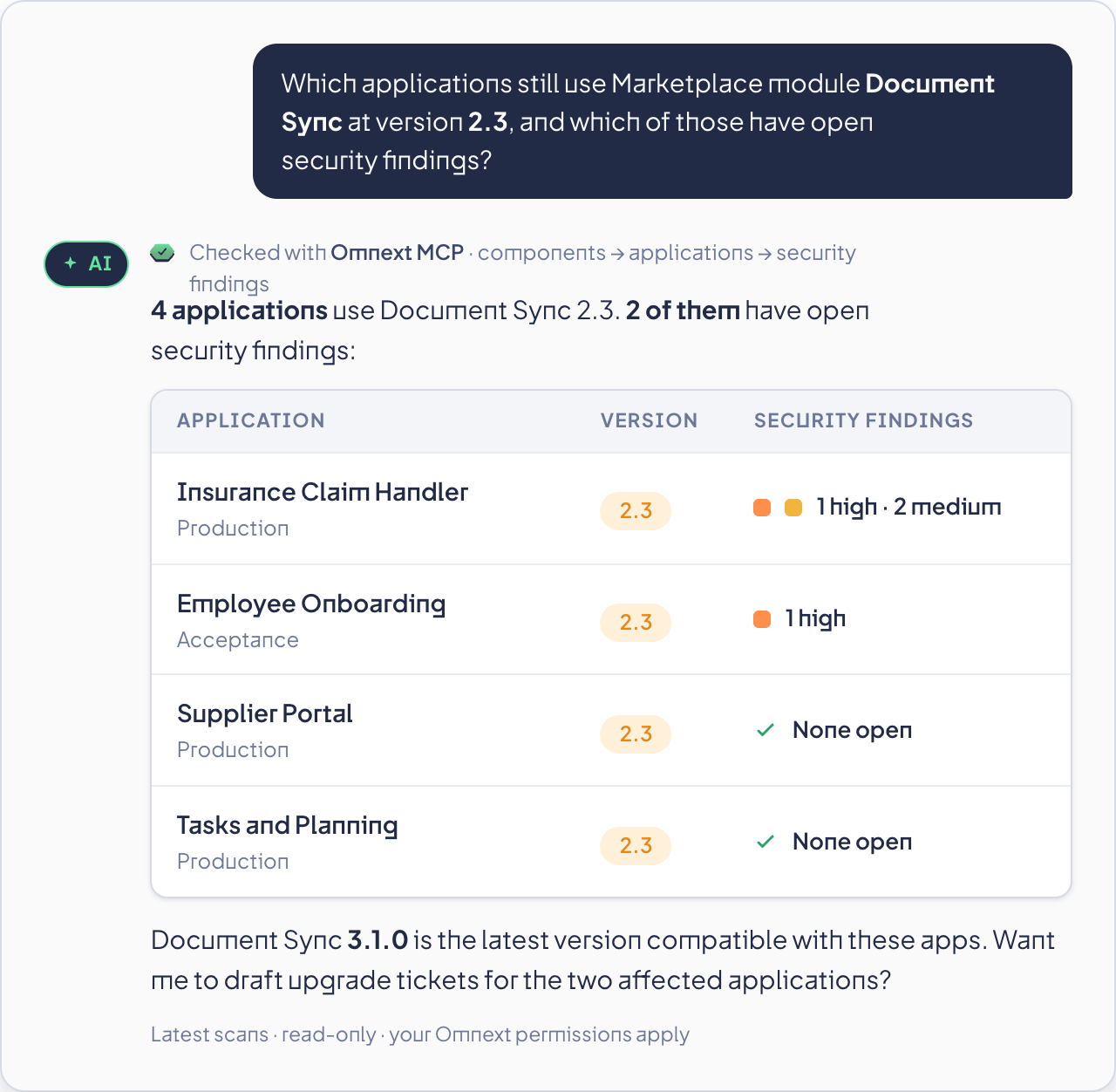
Reporting without a reporting project: which applications use Marketplace module X at version Y? Where else does this pattern occur? Which apps dropped a rating since the last release? The agent combines ratings, findings, metrics and components across applications and scans.

Use case 03

AI-built apps, independently checked

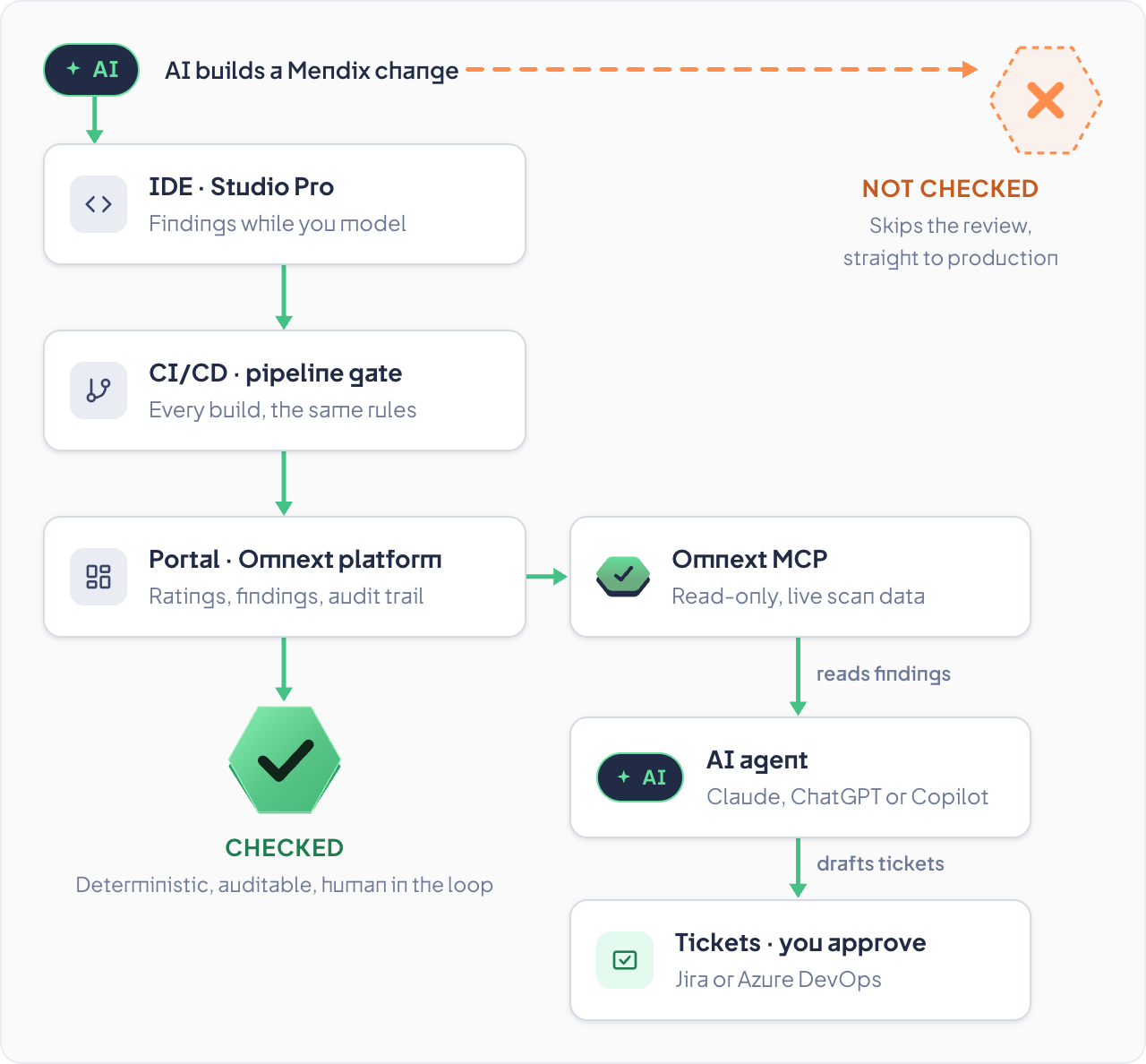
Coding agents and assistants consult the same ruleset while they build, so AI-generated Mendix work is verified by independent, deterministic analysis before it reaches your pipeline.

Use case 04
How it works

Connect once, then just ask.

01

Connect

Add the Omnext MCP server to your AI tool with your own Omnext credentials. One endpoint, no export, no extra infrastructure.

02

Ask

In Claude, ChatGPT, Copilot, an agentic IDE or your own agent, in plain language. The MCP tools describe themselves, so the agent knows what it can query.

03

Combine

The agent chains the tools: from a rule to the applications it affects, from an application to its findings, from a finding to the unit in the model, from a component to every application that uses it.

04

Act

Tickets, reports, fixes, checks in your pipeline. Omnext stays the single source of truth; the MCP never changes a model or starts a scan.

omnext-mcp-trust-diagram-
Trust, but verify

AI builds. Omnext checks. You stay in control.

AI co-develops your applications and AI agents act on your analysis data. Both need an independent, deterministic reference. Omnext is that reference: the same rules in the IDE, in CI/CD, in the portal and in the MCP, with a human in the loop.

Read-only by design: no scans started, nothing changed
Deterministic analysis, no AI inside the scan, no hallucinated findings
The same ruleset in IDE, CI/CD, portal and MCP
Auditable: every answer traces to a rule, a finding or a measured unit
Your permissions apply: an agent sees only what its user may see
FAQ

Frequently asked

Can the MCP change my model or start scans?
No. It is read-only by design. It reads ratings, rules, findings, metrics, components, vulnerabilities and analysis runs; it never writes to a model or triggers an analysis.
Which AI tools work with it?
Any MCP-capable client: Claude, ChatGPT, Copilot, agentic IDEs and agents you build yourself. Connection details are in the knowledge base.
Which data can an agent reach?
The same data its user sees in the portal: the organisations and applications that user is authorised for, with their ratings, rules, findings, model metrics, open-source components, vulnerabilities and scans.
Do we need to export or sync anything?
No. The MCP reads live from the Omnext platform, so an agent always works with the latest scan. There is no copy of your data to keep in sync.
Is my analysis data shared with the AI vendor?
Only what your assistant requests through the tools you enable, under your own AI vendor agreement. Omnext hosts on Azure (EU).
Is the MCP extra?
No. Omnext MCP is part of every subscription, like DevAssist for Studio Pro.
Next step

Put your analysis data to work.

Request a demo and see an agent prioritise findings, check a CVE across the landscape and verify AI-built work against the same ruleset.